We have been working hard behind the scenes, and we are pleased to announce that we have now released our Android App to the Google Playstore! Please read this article carefully for instructions on how to download our new Android app.
GoReport Android App Overview:
What do I need to do if I was using the Mobile Portal?
Do I have to install the app directly from the App Store?
What's different about the Android App?
IMPORTANT: If you previously had access to the beta version of the GoReport Android App, the GoReport Mobile Portal, then there are a few things to note before you get started. Please click here to navigate to the relevant section of this article for further support.
How do I get the app?
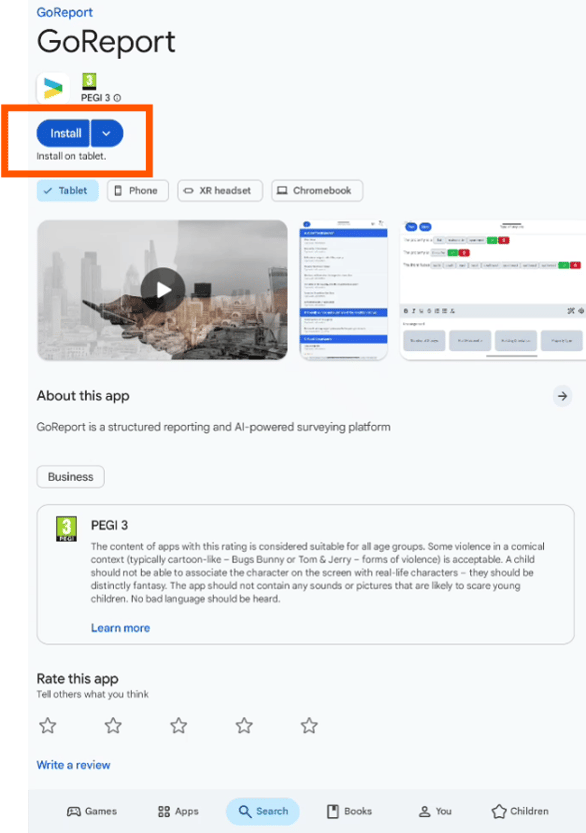
To download the Android app, head to the Google Playstore and search for 'GoReport'.
What do I need to do if I was using the Mobile Portal?
Note: Please read this section carefully, if you have any questions whilst removing the Mobile Portal, please contact GoReport support.
If you were using the Mobile Portal, then you will need to do a few things before you can begin using the Android app.
These steps are relatively straight forward, but if you have any questions, please contact support before continuing.
- First, upload all local reports from your device to your cloud reports;
- Then delete the Mobile Portal app from your home screen.
- Clear your Storage and Cache data for your browser - you can do this in the settings of your device. (If your view doesn't match the one below, please review this guide - Clear cache & cookies - Android - Google Account Help)
Instructions for clearing your browsing data on Android:
Navigate to Settings > Apps > Chrome> Storage > Select Clear Data and Clear Cache.
-png.png?width=279&height=450&name=image%20(1)-png.png)
-png.png?width=278&height=450&name=image%20(2)-png.png)
IOS USERS: If you're using the Mobile Portal on an iOS device, please be aware that this is no longer supported. We recommend using our iOS app (found on the App Store) instead.
Please note that the original Mobile Portal will be retired soon, so we recommend making this switch immediately to avoid any interruptions.
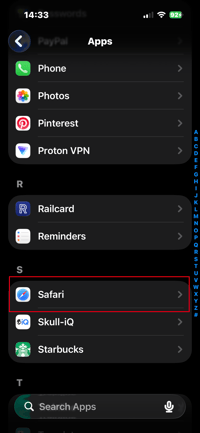
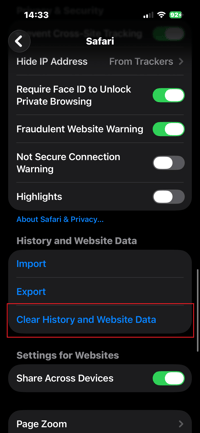
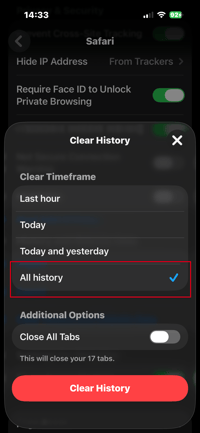
Instructions for clearing your browsing data on IOS:
Navigate to Settings > Apps > Safari > Clear History and Website Data > Select 'All History'.
Do I have to install the app directly from the App Store?
Yes, as we will be removing access via the link and going forward you will only be able to access the app from the Playstore.
What's different about the Android App?
Truly there are very few differences between the Beta Mobile Portal and our Android offering! We've worked hard to ensure that everything will look and feel the same as before.
Current Limitations
At present, the GoReport Android App doesn't support the following features;
- Quick Navigation
- Quick Camera
- Smart Pins
We understand that some of our clients may be reliant on these features, which is why we are working hard to implement them within the GoReport Android App in the future. In the meantime, please feel free to reach out to our Support Team should you require any clarification as to why these features are not available currently.